In IT asset management, information about devices, users, contracts, costs and lifecycle events rarely lives in one place. In addition to the basic information stored in your ITAM tool, other systems such as Microsoft Intune and your partners’ systems hold valuable data, including device details, purchase information, leasing contracts and monthly costs.
This often means that IT teams need to update asset records manually, check multiple systems, and struggle to keep track of asset lifecycles. Over time, the information becomes outdated and then the processes built around it become less reliable even for people who know the game. And I don’t even want to mention what bottlenecks this creates for AI use cases.
Rather than trying to replace everything with a single tool, a better approach is to build an ecosystem around your IT asset management. In this case your ITAM software acts as the central hub, connecting the systems and partners involved in managing your devices.
An ecosystem model improves data quality and enables automation
Updating changes such as device reassignments, employee departures and leasing contract details across several systems takes time, and updates are easily missed.
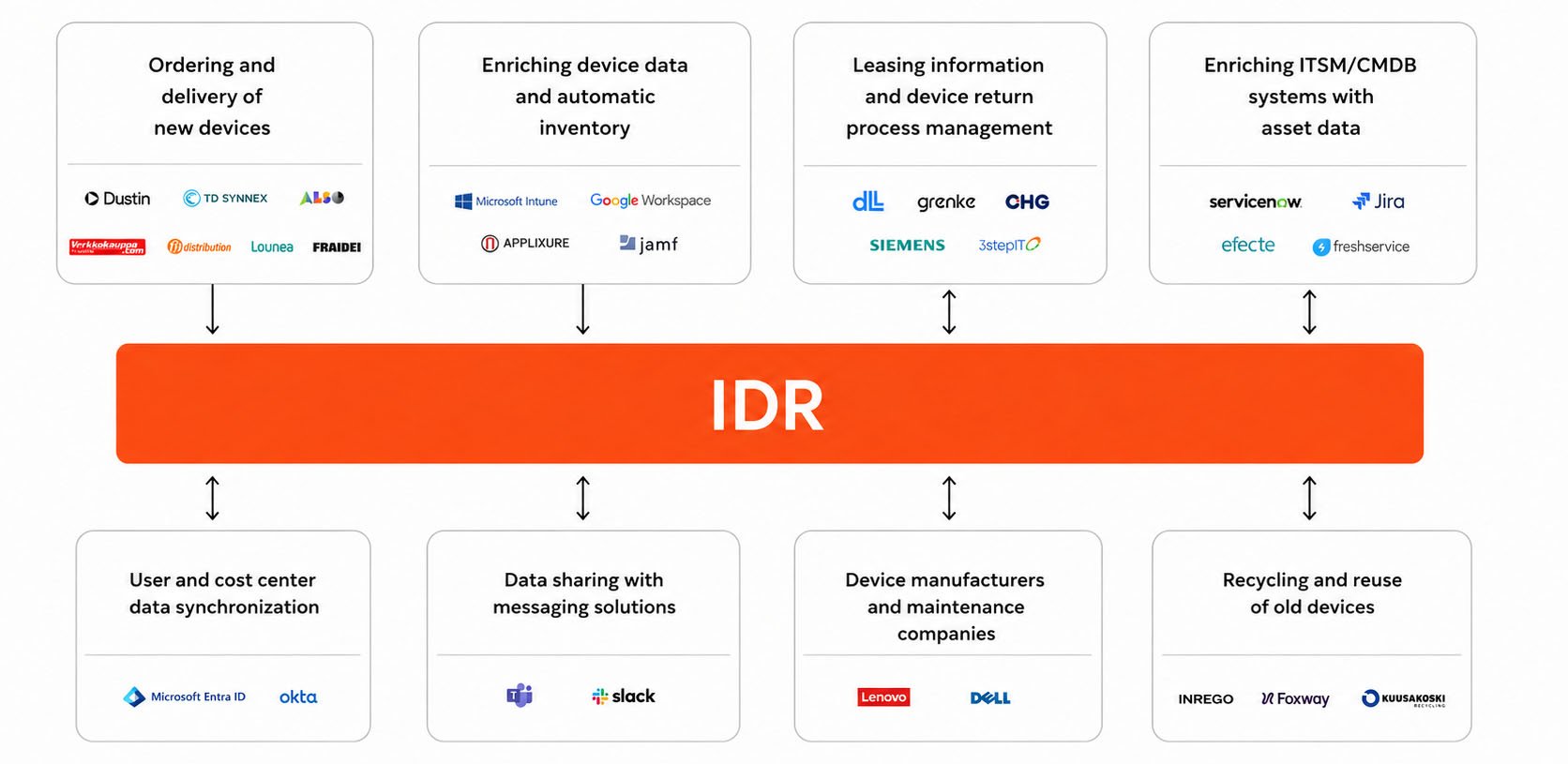
To avoid this, your IT asset management solution should be connected with the systems and partners involved in managing your devices. These typically include:
- Microsoft Intune or another device management platform
- Microsoft Entra ID or another identity system
- Suppliers and resellers
- Leasing and financing companies
- Recycling partners
The other systems do not need to be replaced, but relevant information should flow into one place and provide a single source of truth for your IT asset management processes. This not only saves a lot of time but ensures that data stays up-to-date.
An ecosystem model also enables better automation throughout the device lifecycle, as tasks can be based on information from multiple systems.
The benefit becomes clearer when you look at the asset lifecycle
The best way to understand how the ecosystem works is to look at everyday situations. Here are a few examples of how integrations make IT device management easier.
Let's start from the beginning of the lifecycle. When an employee orders a new laptop, the supplier can automatically register the device and add purchase information via integration to the IT asset management solution. Now the IT team does not need to create a new record or copy information from an order confirmation.
Once the laptop is in use, Microsoft Intune and Entra ID can provide more information about its user, organisation, cost centre and status. This automatically updated information can be then used to set up automations that help IT teams spot issues that need human attention. For example, IT can be notified if an employee leaves the company but still has a laptop assigned to them.
For leased devices, integrations can bring contract details directly from the financing company into the IT asset management solution. This includes the start date, monthly cost, contract length and contract number. As before, this information can for example be used to automatically notify the IT team and employee when a leasing contract is about to end. Information can also flow the other way. For example, if the assigned user or cost centre changes, the updated information can be sent back to the financing company. This helps both parties keep their records up to date without manual work.
In the final stages of a device's lifecycle, an ecosystem model also helps with returns and recycling. When a device is nearing the end of its planned lifecycle, the employee is notified to return it. Once the device has been returned, the recycling partner is automatically notified to arrange collection.
Without an ecosystem approach, even these simple tasks can take several hours a week when managing a large number of IT devices.
IT asset management solution with in-built ecosystem model
An IT asset management solution should be the central place for managing asset information, while also bringing together the information needed to manage the full lifecycle from different systems and partners.
Our approach has been to build IDR around this idea from the start. Instead of treating device data, user information, contracts and lifecycle processes as separate parts, IDR brings them into the same environment where they can be connected to each other.
Integrations are an important part of this. Information can seamlessly flow into IDR from the systems and partners. When something changes, updated information can also flow back from IDR to the relevant system or partner.
The goal is to reduce the need to maintain the same information manually in several places and to give IT one up-to-date view of the device lifecycle. When the underlying data is connected, it also becomes easier to automate the processes from start to finish.
If you want to see IDR in practice and learn more about the software, book a demo.
Want to explore how AI will impact IT asset management? Watch our How to use AI in IT asset management webinar here.